Well Target Mapping
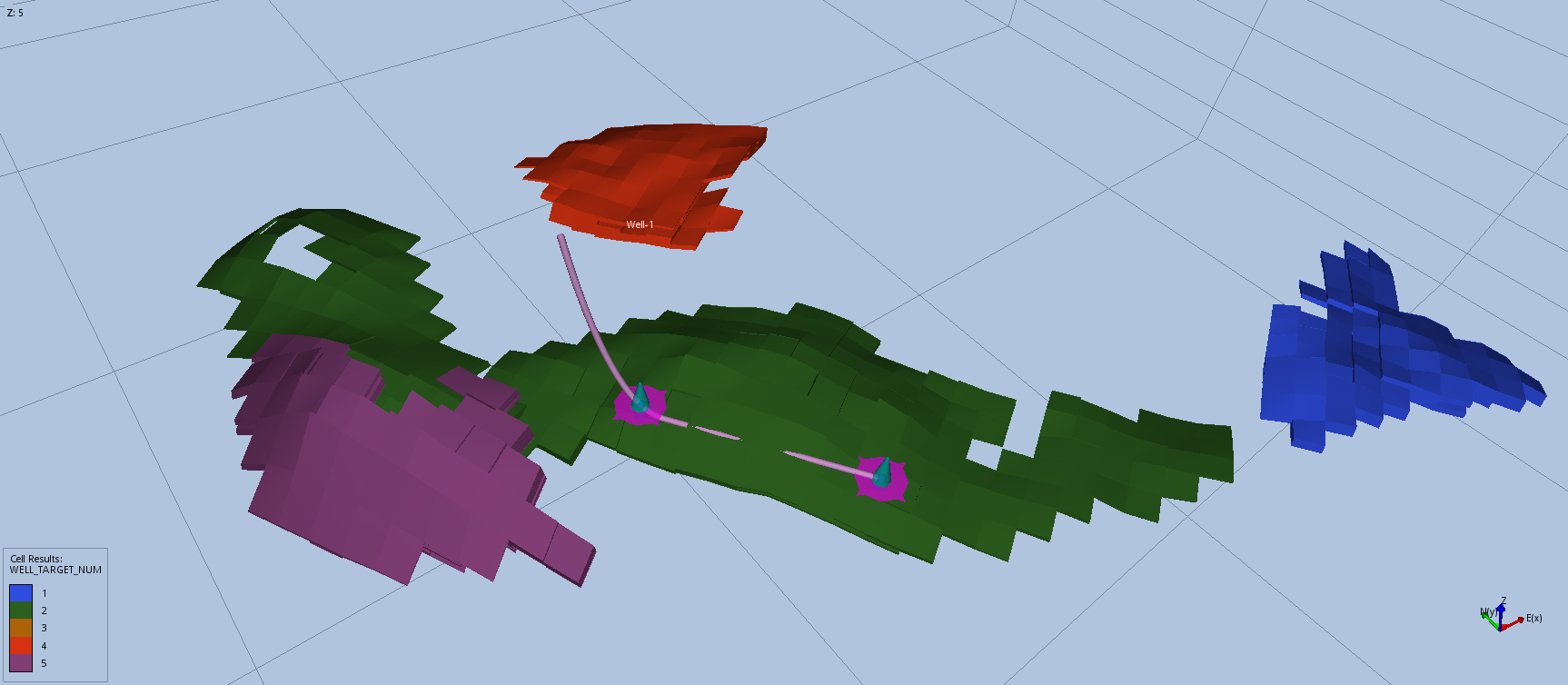
Automatically identify new well target candidates by identifying connected cluster of cells based on user defined threshold values.
Video Tutorial: Well Target Mapping
Configuration
Import a grid model, and from the right-click menu of a grid model select “New Well Target Mapping”. A Well Target Mapping object is displayed with the following options:
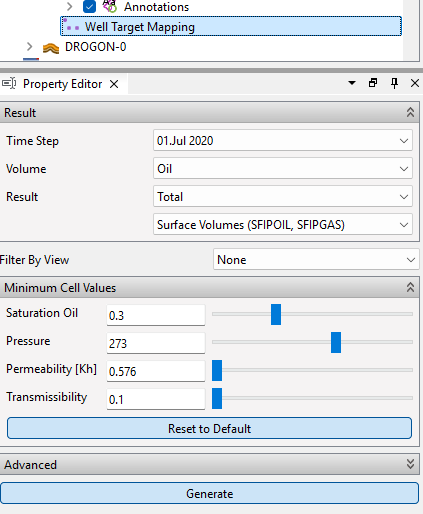
Click Generate button to compute well target candidates for the grid model. Several results will be computed and available for selection in the Generated section for Cell Results. The first available view will be used to display the well target clusters.
Result
- Time Step: the time step of the Eclipse case to produce results for. Default: last time step.
- Volume: Oil, Gas, or Hydrocarbon.
- Result: Mobile or Total.
- Volume type: The vectors used to define the volumes of hydrocarbon. Unavailable options are not shown.
- Reservoir Volumes (PORV*SOIL, PORV*SGAS)
- Reservoir Volumes (RFIPOIL, RFIPGAS)
- Surface Volumes (SFIPOIL, SFIPGAS)
- Surface Volumes (FIPOIL, FIPGAS)
Data Filters
Data filters restrict which cells are used, independent of the cells visible in any view. The filters are selected from the Data Filters defined on the grid model or grid ensemble, see Create Data Filters.
- Start Data Filter: Limits where starting cells for the clusters are searched for. If empty, the Grow Data Filter is used.
- Grow Data Filter: Limits where clusters can grow. If empty, clusters can grow anywhere in the model.
- Avoid Growing Across Faults: Do not grow clusters across fault faces or fault NNCs. A result with the number of fault faces per cell is also generated.
Note
The Filter By View option used in version 2026.09 and older has been replaced by data filters. A view filter stored in an older project is not applied. Create a data filter to get the same result.
Minimum Cell Values
Filter which defines the threshold values to include a candidate cell to a cell cluster.
- Saturation Oil: Saturation of oil (fraction). Default: 0.3.
- Saturation Gas: Saturation of gas (fraction). Default: 0.3.
- Pressure: Minimum pressure. P90 of pressure values.
- Permeability: Minimum horizontal permeability (i.e. PERMX).
When Hydrocarbon Volume is chosen either Saturation Oil or Saturation Gas has to be equal to or above the threshold.
Total Volumes
| Volume | Equation |
|---|---|
| Oil | $VOLOIL_t = PORV * SOIL_t$ |
| Gas | $VOLGAS_t = PORV * SGAS_t$ |
| Hydrocarbon | $VOLHC_t = PORV * SOIL_t + PORV * SGAS_t$ |
Gas volume is converted to oil equivalents.
Mobile Volumes: Oil
| Volume Type | Residual Oil Given By | Equation |
|---|---|---|
| PORV*SOIL | Gas Flooding | $VOLOIL_t = max( PORV * SOIL_t - PORV * SOGCR, 0.0)$ |
| PORV*SOIL | Water Flooding | $VOLOIL_t = max( PORV * SOIL_t - PORV * SOWCR, 0.0)$ |
| PORV*SOIL | User Defined Value | $VOLOIL_t = max( PORV * SOIL_t - PORV * value, 0.0)$ |
| FIPOIL | Gas Flooding | $VOLOIL_t = max( FIPOIL * ( SOIL_t - SOGCR) / SOIL_t, 0.0)$ |
| FIPOIL | Water Flooding | $VOLOIL_t = max( FIPOIL * ( SOIL_t - SOWCR) / SOIL_t, 0.0)$ |
| FIPOIL | User Defined Value | $VOLOIL_t = max( FIPOIL * ( SOIL_t - value) / SOIL_t, 0.0)$ |
Mobile Volumes: Gas
| Volume Type | Residual Gas Given By | Equation |
|---|---|---|
| PORV*SGAS | Gas Flooding | $VOLGAS_t = max( PORV * SGAS_t - PORV * SGCR, 0.0)$ |
| PORV*SGAS | User Defined Value | $VOLGAS_t = max( PORV * SGAS_t - PORV * value, 0.0)$ |
| FIPGAS | Gas Flooding | $VOLGAS_t = max( FIPGAS * ( SGAS_t - SGCR) / SGAS_t, 0.0)$ |
| FIPGAS | User Defined Value | $VOLGAS_t = max( FIPGAS * ( SGAS_t - value) / SGAS_t, 0.0)$ |
Gas volume is converted to oil equivalents.
Mobile Volumes: Hydrocarbon
The mobile hydrocarbon volume is sum of the oil and gas volumes.
$VOLHC_t = VOLOIL_t + VOLGAS_t$